Suppliers and price quotes
The Suppliers area keeps your contacts and turns a bill of materials into a price request. The supplier answers through a secure link, without an account; imported prices then feed the BOM and the estimate with their provenance attached.
Access and roles
Path: main menu → Suppliers. Contacts and requests belong to the organization. A request is only listed if you can access the project it targets; managers see all of the organization's supplier records. A viewer reads; an editor or project administrator creates, sends, revokes and imports.
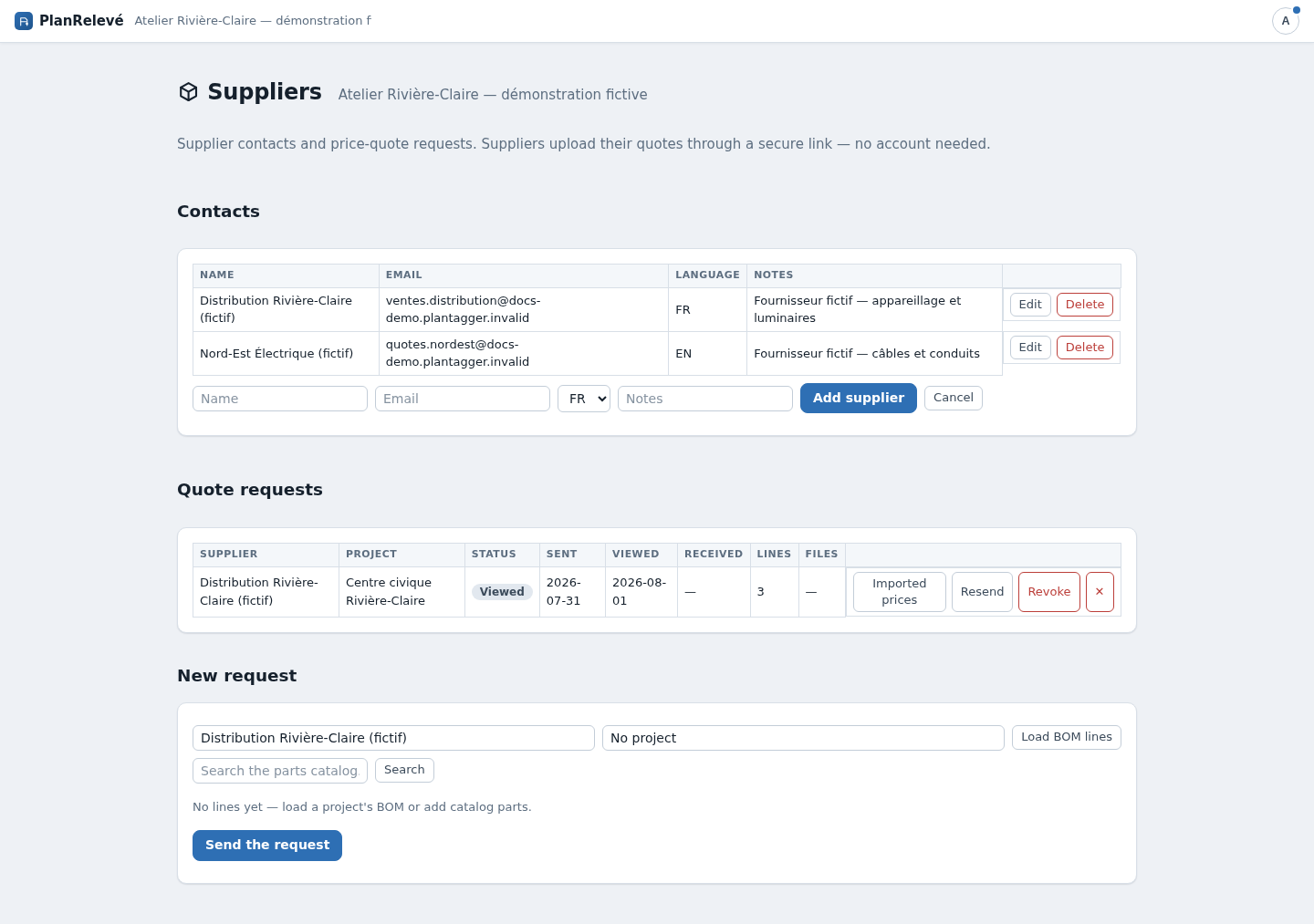
Send a price request
- Under Contacts, fill in Name, Email, Language and Notes, then Add supplier. The language you choose sets the language of the email and of the supplier's page.
- Under New request, choose the supplier and the project, then Load BOM lines. You can also Search the parts catalog… and Add lines that are not in the BOM. A request holds at most 500 lines.
- Check the lines, then Send the request.
The supplier receives a bilingual email holding a secure link valid for 14 days. The page asks for no account: it shows the requested lines, offers a ready-to-fill template to download (CSV or Excel, one row per part with an empty unit-price column) and accepts the completed file.
Track, revoke, resend
The Quote requests table follows every state: Sent, Viewed — with the date the supplier first opened the link —, Received, Revoked, Expired and Send failed. A failed send is retried with Resend, which issues a new link and kills the previous one. Revoke closes access immediately.
Uploads are capped: 10 MB per file, 10 versions and 50 MB in total per request. The link locks itself as soon as a price has been imported or the request is closed. Deleting a request removes its received files — unless imported prices came from it, in which case the price history is protected and the request can only be revoked.
Import the received prices
- On the received request, choose Map & import.
- Under Column mapping, point out the Part number column and the Price column; Unit column and Quantity column are optional. Suggest (AI) can propose the mapping — review it before importing. The lines you requested are shown above the file preview.
- Set Price expiry (optional) if the quote carries one, then Import prices.
Rejected rows are listed with their reason: unreadable price, part not in the catalog or project, missing part number or already imported (same price). A price quoted per box stays a per-box price, including on your own custom parts. Import with the assistant hands the same operation to the AI assistant, which presents its mapping before writing; the write stays an approved action.
Effect on prices, limits and recovery
The newest valid price for a part is applied automatically in the BOM and the estimate, carrying a Supplier quote badge. Your project prices still win. A quote older than 30 days is marked Over 30 days old, and an Expired price falls back to the catalog price.
Void this price removes a wrong value from every future calculation while keeping the record; revoking a request also voids the prices it brought in. A price quoted for one project's custom part does not leak into another project, whereas a catalog price applies organization-wide. Downloadable templates neutralize spreadsheet formulas. After correcting a price, produce a new export: files already issued do not change.