End-to-end takeoff method
PlanRelevé keeps the drawing, review evidence, material logic and estimate in one chain. The safest workflow is to move from page scope to reviewed quantities before applying prices.
1. Upload and analyse
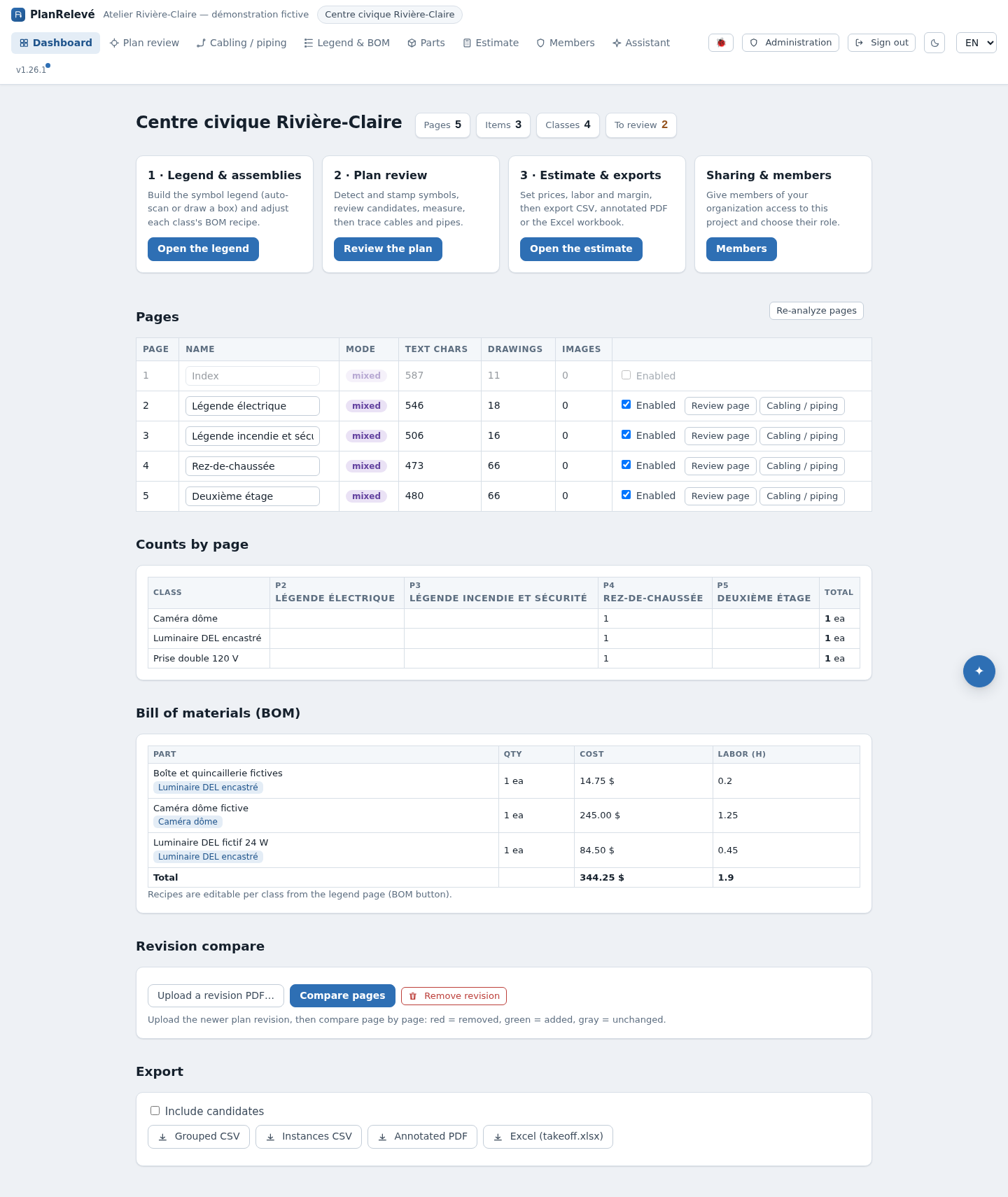
From Projects → New project, an editor names the project and uploads one PDF. PlanRelevé stores the file for the organization, splits it into sheets, renders review images and identifies each page as Vector + text, Vector or Scanned.
This distinction changes the detection engine, not the business meaning of the sheet. Vector pages retain paths and can be compared by exact geometry. Scanned pages use image contours and templates. Both support manual placement, scale, paths and areas.
First disable non-scope pages. All-page operations use enabled pages only.
2. Create a project legend
The legend establishes class names such as Smoke detector, Duplex receptacle or Sprinkler head and, where possible, a visual signature.
You can:
- scan a legend page, inspect proposals, then Save selected;
- draw a tight Symbol box around one plan/legend instance;
- choose a built-in PlanRelevé symbol;
- upload a safe raster icon;
- turn a reviewed plan-side detection into a project symbol or add it as an exemplar.
Legend scan is deliberately two-stage: discovery does not write dozens of rows until you choose what to save. Confirming a legend item means it is ready for the project's detection/assembly workflows; it does not confirm any device occurrence.
3. Detect occurrences
In Plan review, Run detection creates a background job. For each class and page, the engine selects a compatible route:
- vector geometry/signature matching for line/path symbols;
- template matching when a reusable crop is available;
- raster contour matching on scanned pages;
- text-assisted matching for relevant labels.
A modern browser with Web Workers and WebAssembly can assist with the geometry calculations. It receives the queued page task, runs the same matching kernel locally and posts back scores. If the browser cannot help, a worker fails, the tab closes or the handoff expires, the server computes the page instead. Closing the tab can make a run slower but should not invalidate the job.
A rerun replaces prior automated detections for the run scope while preserving manual work. Read the summary for created, replaced, skipped and weak-class information.
4. Review evidence, not just totals
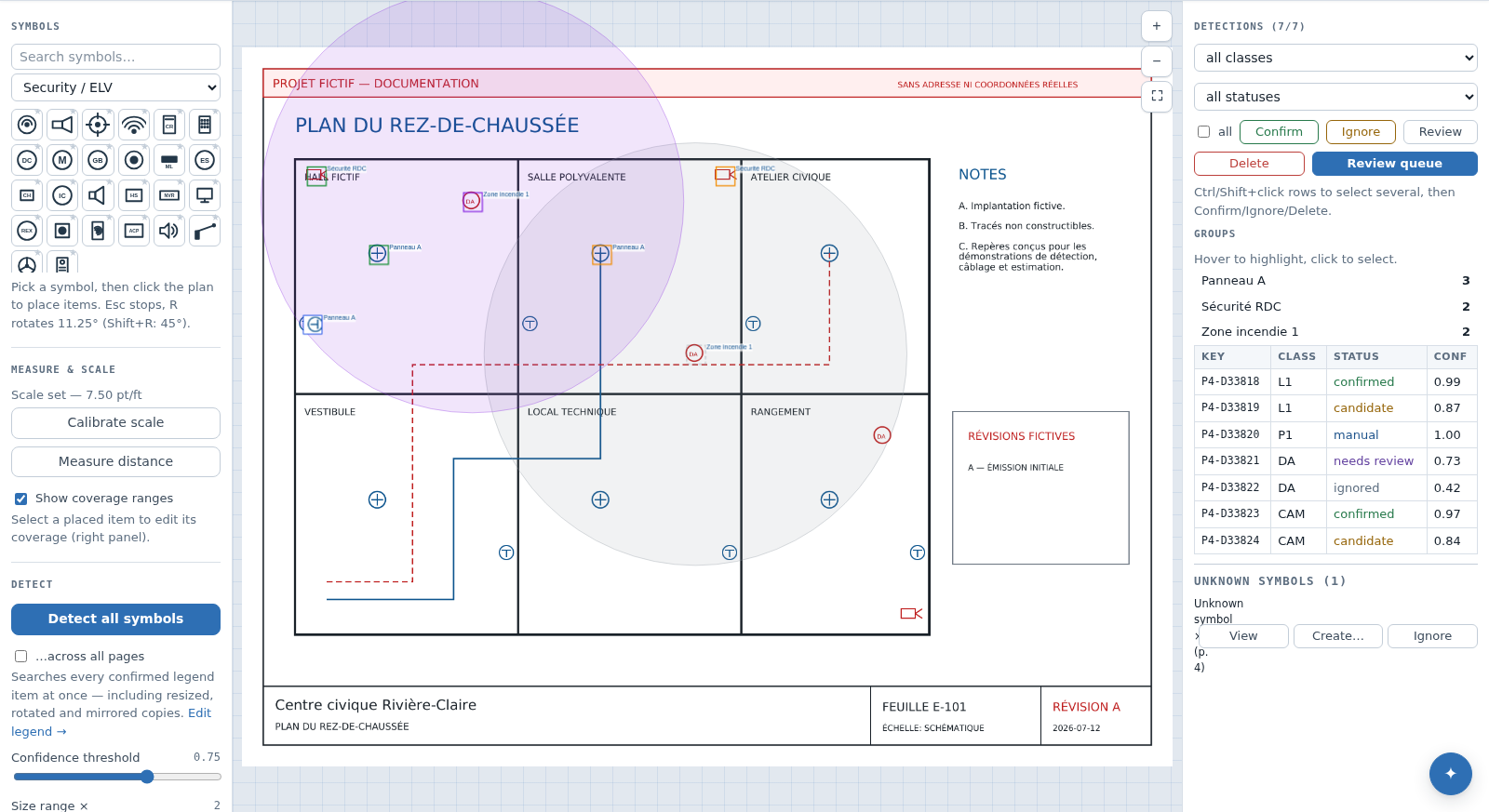
Automated hits normally arrive as candidate or needs review. A reviewer confirms a correct match, ignores a false positive or leaves an ambiguous item for follow-up. Manual boxes represent explicit user additions. Default counts include confirmed and manual, not candidates/needs-review/ignored.
Auto-confirm is optional. The configured threshold is only a starting point. After enough current, comparable false positives have been ignored for a class, PlanRelevé applies a conservative class-specific calibrated boundary and keeps ties in review. This reduces, but cannot eliminate, false positives. Always inspect clustered and unusual populations.
Use plan-side controls to improve the model:
- Find similar from selected searches from one or more actual occurrences;
- Save selected as legend symbol creates/updates a project signature;
- Use as example for class supplements a generic legend sample;
- Unknown symbol suggestions groups repeated unexplained shapes to view, convert to a class or dismiss.
5. Add linear and area quantities
A page scale converts drawing points into feet/metres and square feet/metres. With the Cable (W), Pipe (P) and Zone (Z) tools on the plan review page:
- trace cable runs with type, gauge, multiplier, extra length and conduit;
- trace pipes with diameter and stock-stick rounding;
- use device/wall snapping or auto-route between confirmed devices;
- group runs by panel, zone or system;
- draw area polygons and voids.
Scale is per sheet. Unscaled paths are stored but show no calculated length; unscaled polygons show no area. Recalibrating updates calculations from the stored geometry.
6. Convert counts to materials
PlanRelevé uses a three-tier catalogue:
- a read-only shared PlanRelevé catalogue;
- an organization library shared by that organization;
- project parts and overrides.
An assembly maps one symbol class to a recipe of parts and quantities. The BOM multiplies only reviewed counted states by the assembly recipe, then lists unmapped classes separately. Cable/pipe/conduit quantities remain available as run material and can be priced in the estimate.
7. Build the estimate
The estimate combines:
- BOM material cost;
- part labour hours at the project hourly rate;
- cable/pipe/conduit length and per-unit price/labour;
- free lines for permits, rentals or other scope;
- margin;
- a project tax snapshot selected from organization tax groups.
Organization-library prices are reference data; using one in a project creates/updates a project snapshot. This helps an issued estimate remain reproducible when the library later changes. Recheck stale-price indicators before export.
8. Revise and export
A revision is uploaded separately. PlanRelevé matches sheets primarily by drawing/CAD identifier and falls back to normalized title; page index is not treated as authoritative. Review automatic matches, correct them manually, compare added/removed detections and transfer confirmed/manual takeoff as appropriate.
Exports are generated from current stored state. Choose deliberately whether candidate detections should be included. Standard variants include grouped/per-box takeoff CSV, annotated PDF, BOM CSV, XLSX takeoff, estimate PDF and cabling inventory/drawing outputs. Exports can therefore differ if review status or estimate settings change.
Quality gate
Before issuing:
- verify source revision and enabled pages;
- verify scale independently;
- resolve all in-scope candidates/needs-review populations;
- inspect symbol, cable, pipe and area edge cases;
- review unmapped classes and catalogue snapshots;
- check labour, margin, free lines and tax;
- record which export options were used.
See Review quality, BOM, Estimating and Exports.