API and MCP integrations
PlanRelevé currently exposes organization integrations through a stateless Model Context Protocol (MCP) endpoint. It lets a compatible external assistant query project takeoff data and, only when explicitly authorized, apply project changes. The administration page does not issue a separate general-purpose REST API key.
Prerequisites and security boundary
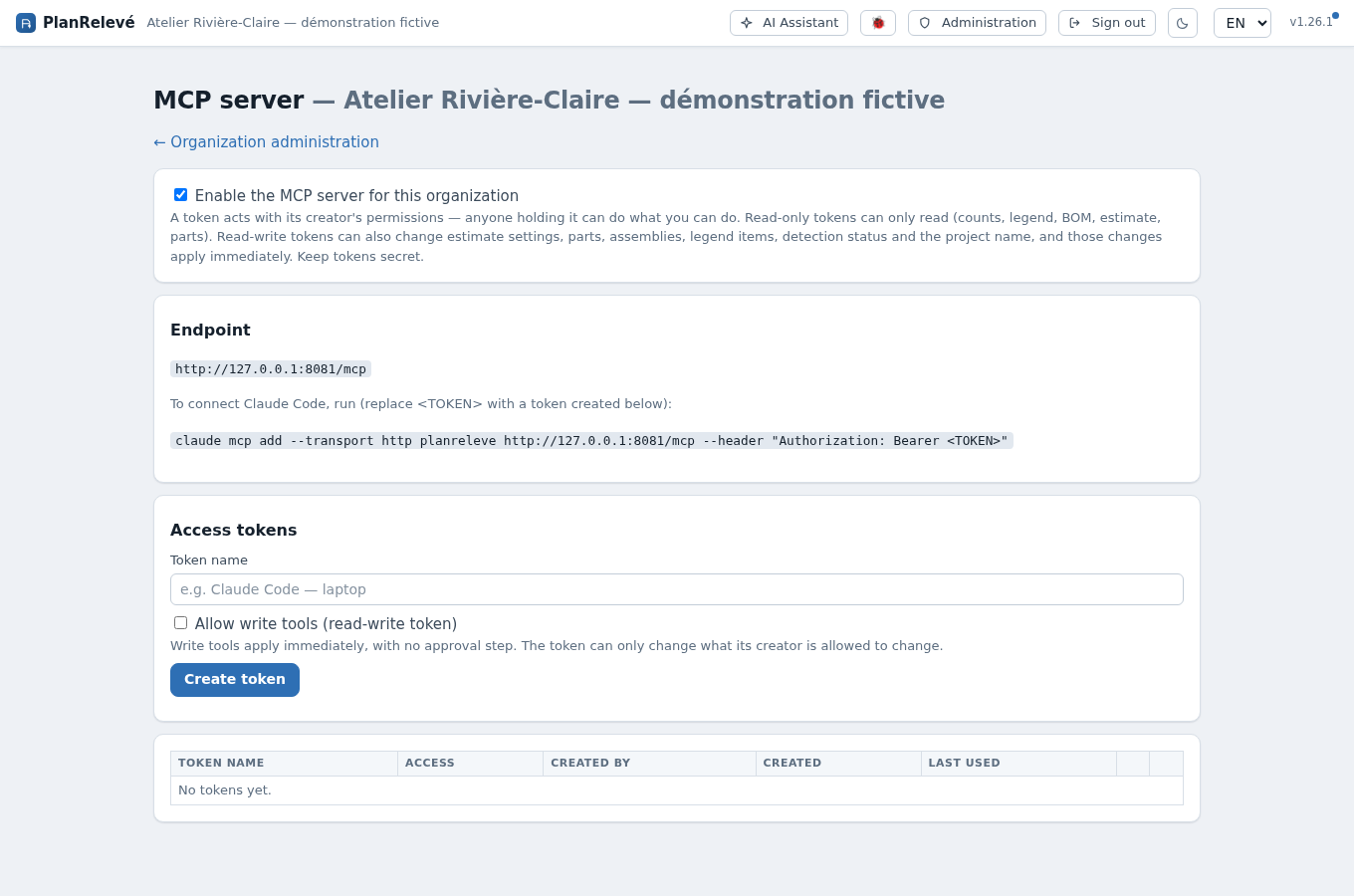
UI path: top navigation → Administration → MCP server
Only an organization Owner or Admin can open this page, enable MCP, create tokens or revoke them. A token:
- is limited to the creator's organization;
- acts as its creator, not as a new service account;
- has project permissions rechecked on every call;
- is Read-only unless Allow write tools (read-write token) was selected;
- stops working if revoked, if its creator is deactivated or no longer belongs to the organization, or while MCP is disabled organization-wide.
Because the current token creators are Owners/Admins, they normally have broad organization-project access. If the creator's role/access later changes, the token follows the new effective access. Cross-organization project identifiers are not exposed.
Enable the MCP endpoint
- Open Administration → MCP server.
- Select Enable the MCP server for this organization.
- Wait for Saved. If the save fails, the checkbox returns to its prior state.
- Copy the dynamic Endpoint shown on the page; it ends in
/mcpfor the current PlanRelevé host.
The endpoint accepts Streamable HTTP MCP requests using bearer authentication. The client places the copied secret in the HTTP Authorization header with the Bearer scheme. Use the setup command displayed on the page for Claude Code or translate the same endpoint/header into another compatible client's configuration. Do not put a real token into chat, a ticket, source control, browser-side code or a shared command history.
Disabling the organization switch refuses every connection, even one presenting a valid active token. This is an organization-wide pause; it does not convert or delete token rows.
Create a read-only token
Read-only is the safe default for reporting, search and integration testing.
- Under Access tokens, enter a specific Token name, such as the client and workstation or automation owner.
- Leave Allow write tools (read-write token) clear.
- Select Create token.
- When Copy this token now — it will never be shown again. appears, copy it to the client's secret store.
- Verify the token inventory shows its name, prefix, Read-only, creator, creation date, Never under Last used and Active.
- Configure the client and make a simple
pingorlist_projectscall. After successful use, refresh the page and verify Last used is populated.
Only the token hash and a short prefix are retained by PlanRelevé. If the one-time value is lost, it cannot be recovered; revoke the row and create a replacement.
Read workflow and results
A practical client flow is:
- call
list_projectsto receive only active projects the creator can view and their project UUIDs; - pass one returned
project_idtoget_counts,get_legend,get_bom,get_estimate,search_parts,get_suggestions,get_detection_qualityorget_attributes(confirmed attribute values per class); - use
get_export_linksonly when the creator has project export permission — it covers every download the project has: the estimate PDF, the takeoff workbook, the annotated plan, the cabling and piping PDF, and the grouped, instances and cabling CSVs; - validate quantities against the current project state in PlanRelevé.
Counts come from reviewed project data; candidates are not silently promoted. Amounts are CAD. Export links point back to the web application and require an authenticated browser session—the bearer token is not a downloadable-file session. Read MCP errors as results: project not found intentionally covers both missing and out-of-tenant identifiers, while forbidden means the creator lacks the required project permission.
What the server does not expose
The list returned by tools/list is deliberately narrower than the assistant's:
- Supplier-quote tools — list requests, read a received file, import prices, void a price — stay with the assistant. They are organization-level operations, and the import runs through an approved action plan that MCP's immediate-execution model has no equivalent of.
- Web search and page fetching are not project tools and are not exposed either.
- Tools for a feature turned off for your organization, or for a parked surface, are hidden rather than deleted: while Revisions are parked their tools do not appear in the listing, instead of being advertised and then answering "not enabled". They return the moment the flag flips.
- An archived project can be read and exported, but no write reaches it — through the application, the assistant or MCP alike.
Opt in to write access only when required
To create a read-write token, repeat the creation flow and select Allow write tools (read-write token) before Create token. Write tools can change estimate settings, free lines, run pricing/labour, tax selection, parts, assemblies, legend items, classes, detection statuses and project names; the exact tool list is advertised by the server.
MCP writes apply immediately. They do not use the in-app AI assistant's action-plan approval screen. Two gates still apply: the token must be read-write, and the creator must currently hold the tool's project edit/review permission. A read-only token neither advertises write tools nor accepts a write call.
Use a separate token per client/purpose, request a fresh read immediately before a write, confirm the target project UUID and avoid unattended destructive calls. Prefer read-only whenever a report or export link is sufficient. Compare this boundary with AI assistant and approved actions and Members, roles and invitations.
Revoke, rotate and audit
UI path: Administration → MCP server → Access tokens
Select Revoke, confirm, and verify the row changes from Active to Revoked. Connected clients lose access immediately. Recreate rather than trying to reuse a revoked or lost token. Also revoke when a device is lost, a workflow is retired, a token may have entered logs, or the creator leaves the organization.
The token inventory shows Created by, creation date and Last used. Last used is a coarse activity signal updated periodically, not a request-by-request audit log. MCP enable/disable, token creation and revocation are recorded as organization audit events; do not claim that this substitutes for the external client's own call logging. Review Administration → Audit log and the client's logs together. See Organization administration and Security, privacy and Law 25.
Connection recovery
- 401 Unauthorized: check the bearer header, one-time value, revocation and whether the creator is active. Replace a lost token; do not guess it from the displayed prefix.
- 403 Forbidden at the endpoint: an administrator may have disabled MCP for the organization. Confirm the dashboard shows Enabled.
- Tool-level forbidden: the token authenticated, but its creator lacks that project operation; correct project access instead of issuing a broader shared token.
- Write tool missing/read-only error: create a purpose-specific read-write token only after reviewing the immediate-write risk.
- No projects: confirm the creator can open the expected active project in the web UI and that the client is connected to the correct PlanRelevé host.