Cabling and piping
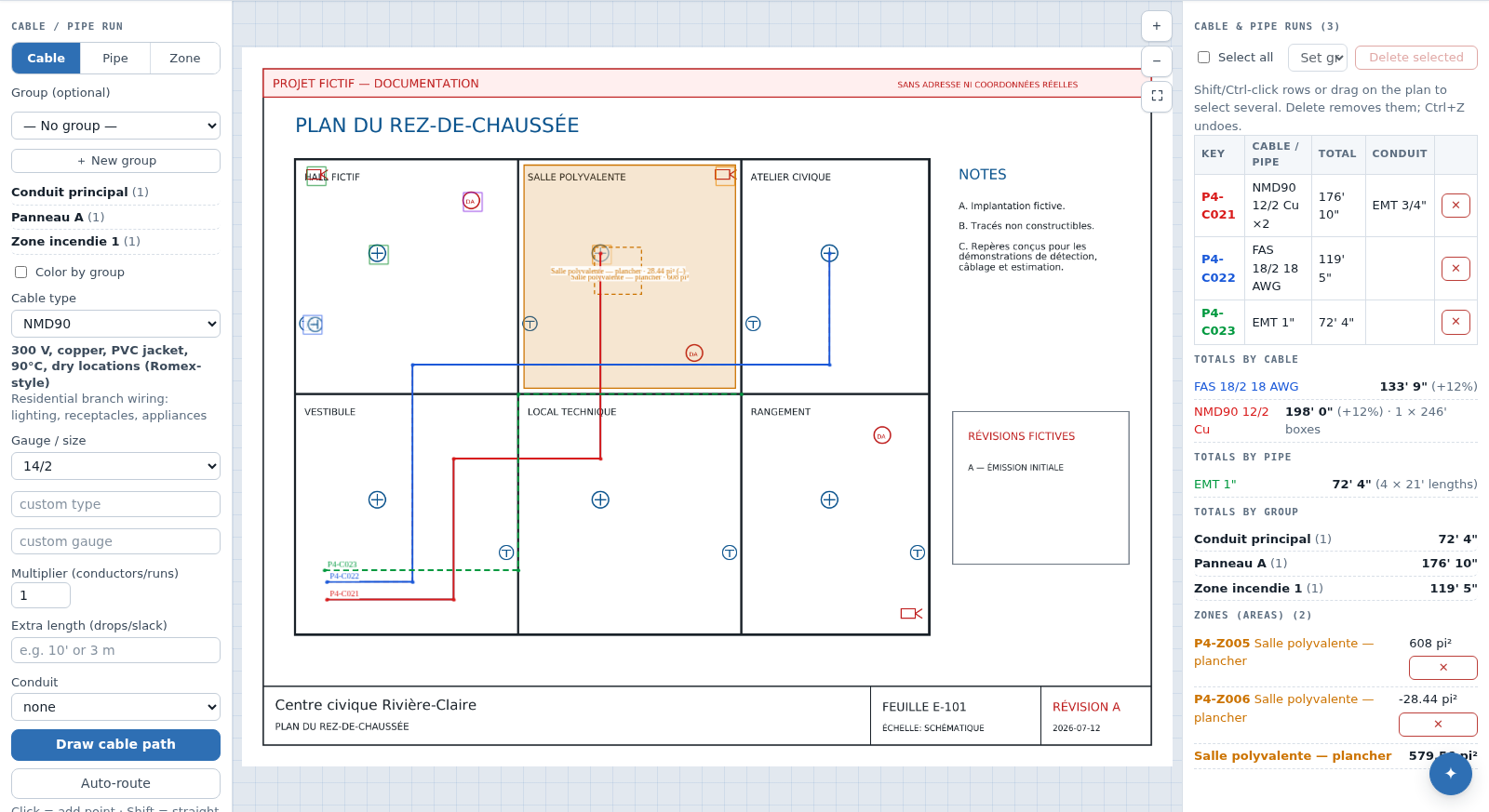
Cabling / piping measures scaled polylines and keeps their vertices on the plan. It manages cables, shared conduit, pipes, groups and areas on the plan review page, with the same symbols and the same sheet selector.
Access and preparation
Path: project → Plan review → the Cable (W), Pipe (P) and Zone (Z) tools. This is no longer a separate screen: the tools draw on the review canvas. The Cabling / piping button on a dashboard page row opens that same page with the cable tool already armed. A viewer may inspect; an editor or project administrator is required to draw, modify or delete. Disabled sheets do not appear in the selector, and their runs are excluded from totals, estimates and exports.
- Calibrate the sheet against a known dimension. Without scale, a run can be drawn but its real length remains unknown.
- Select Cable or Pipe, then a preset type and gauge or diameter. Use the custom fields when the family is not listed.
- Optionally assign a group, such as an electrical panel or fire zone. Colouring and subtotals can follow that group.
- For a cable, set the multiplier, extra length and conduit. For a pipe, the multiplier is always 1 and separate conduit does not apply.
- With the tool armed, click to add points; Shift constrains the segment, Backspace removes the last point, Enter or a double-click finishes, and Esc cancels. The context menu also offers Trace a cable here and Trace a pipe here.
Endpoints, junctions and automatic routing
Snapping can target confirmed or manual devices. When Automatic drops is on, devices at the endpoints add their default drop to extra length. Check this value if slack was already entered manually.
Hold J while clicking a run of the same kind to create a tee. The context menu can also start a branch at a point or detach a joined endpoint. For Automatic path, select two devices and PlanRelevé proposes a route around detected obstacles. It is a proposal; inspect the corridor, penetrations and constructability.
Reference lines can guide snapping and automatic routing. Snap radius is project-wide; a radius that is too large may pull a vertex to the wrong device.
Review and correct
The Runs list & export panel enumerates the sheet's runs; click a row to centre it on the plan. Right-click a run for Edit points — then Add a point here, Remove this point and Done editing points —, Circuit, Run properties (type, multiplier, Extra length…, Conduit size…) and Note… for your own remark.
A multi-selection groups the actions: Set group for {n}…, type, multiplier, Conduit size… and Delete {n} run(s). Ctrl+A selects every run on the page. Ctrl+Z / Ctrl+Y undo and redo in a single history shared with symbols: deleting symbols and runs together is restored in one step.
Cable length is calibrated geometry multiplied by the pull count, plus extra lengths, then increased by the spare percentage in totals. Shared conduit is not multiplied by conductor count; it uses its own conduit spare percentage. Pipes group by type and diameter, with stock-length rounding and estimated elbows, tees and couplings.
Estimate, export and recovery
In the estimate, each type/gauge combination receives a material price per foot and labour hours per foot; conduit is a separate line. CSV, PDF and XLSX outputs carry spare values and groups; see Exports.
If a total looks wrong, check in this order: scale, imperial/metric unit, vertices, multiplier, extra length/drops, spare and active sheet state. After recalibration, the same vertices are recalculated; review the result before redrawing.