Attributes read off the plan (wattages)
An attribute is a value printed next to a symbol on the plan — starting with the wattage of baseboards and other heaters (750 W, 1000 W, 2000 W…). PlanRelevé reads those labels, proposes a value for each symbol with the source text as evidence, and then splits quantities by value in the bill of materials, the estimate and the exports.
Access and preparation
Path: project → Plan review → Attributes (A) tool. Reading relies on the PDF's text, so it assumes a vector page and detections that are already confirmed. On a scanned page, or while nothing is confirmed, the panel says so instead of guessing.
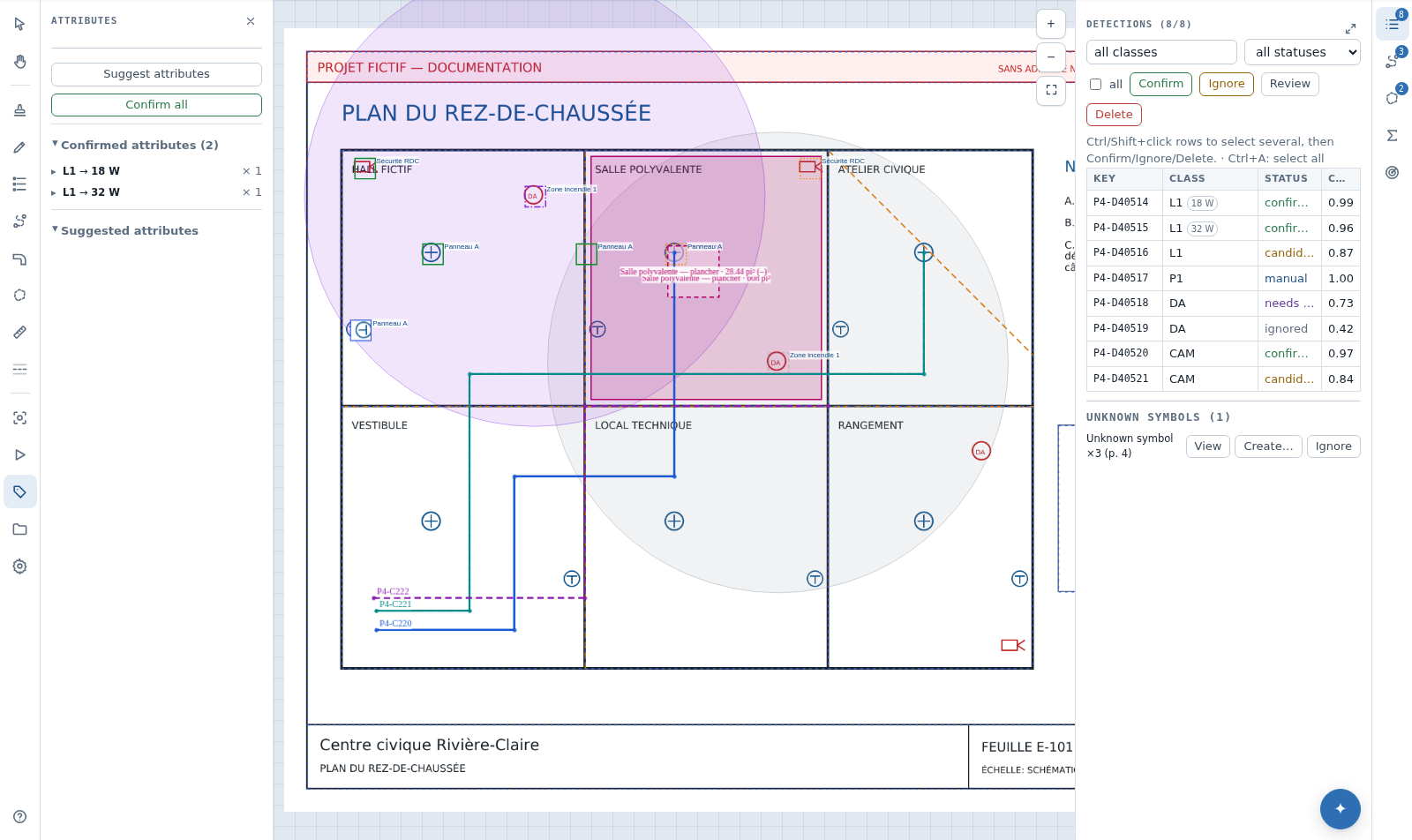
- Confirm the symbols you care about first, in the review queue.
- Arm Attributes (
A), then choose Suggest attributes. The header reports how many labels were read and how many confirmed symbols were eligible. - Check each proposal against its source text and confirm it — or use Confirm all when the page is uniform.
A row set aside with Show again only disappears for the current visit; nothing is deleted and the suggestion returns when you reload the page.
Unassigned labels
PlanRelevé lists what it refuses to guess under Unassigned labels, with the reason: shared run label for a callout such as "3× 1000W", ambiguous: two symbols equally near, nearby symbols already assigned, no symbol in range or no confirmed detections. These cases are settled by hand rather than by approximation.
For symbols the plan does not label, select them on the canvas, type the value under Assign manually, then Apply. The Confirmed attributes section then lists every symbol carrying a value, grouped by class and value, with inline editing and Clear.
Effect on pricing
Each confirmed value becomes its own item: a 1000 W and a 250 W baseboard no longer collapse into a single "baseboard" line. The estimate, the BOM and supplier quote requests show "Baseboard — 1000 W", "Baseboard — 250 W" and a no-attribute remainder, each with its own quantity.
To price a value with its own parts and labour, name an assembly class::wattage_w=1000 — for example plinthe_electrique::wattage_w=2000. Without an assembly of that name, each value inherits the class recipe, so your totals do not move until you decide otherwise.
Assistant, limits and recovery
The AI assistant and MCP expose the same material: get_attributes lists confirmed values per class and set_detection_attribute assigns a value to symbols — with your approval, as with every write.
A value that has been read is a reading of the plan, not an engineering decision: a label can belong to a circuit, a voltage or a legend callout rather than the symbol beside it. Check the flagged cases before you bid. If a quantity looks wrong, verify in this order: detection status, the class's confirmed values, the no-attribute remainder, the exact name of the variant assembly, then the class recipe.