Estimating, labour, margins and taxes
The Estimate page turns a reviewed takeoff into a bid: material and hours from the bill of materials, cable and pipe lengths, area surfaces, additional lines, labour rate, margin and taxes.
Access and inputs
Path: project → Estimate. A viewer reads; an editor or project administrator changes settings and exports. Only confirmed and manual detections on enabled pages feed the bill of materials. Candidates, ignored items and disabled pages are excluded.
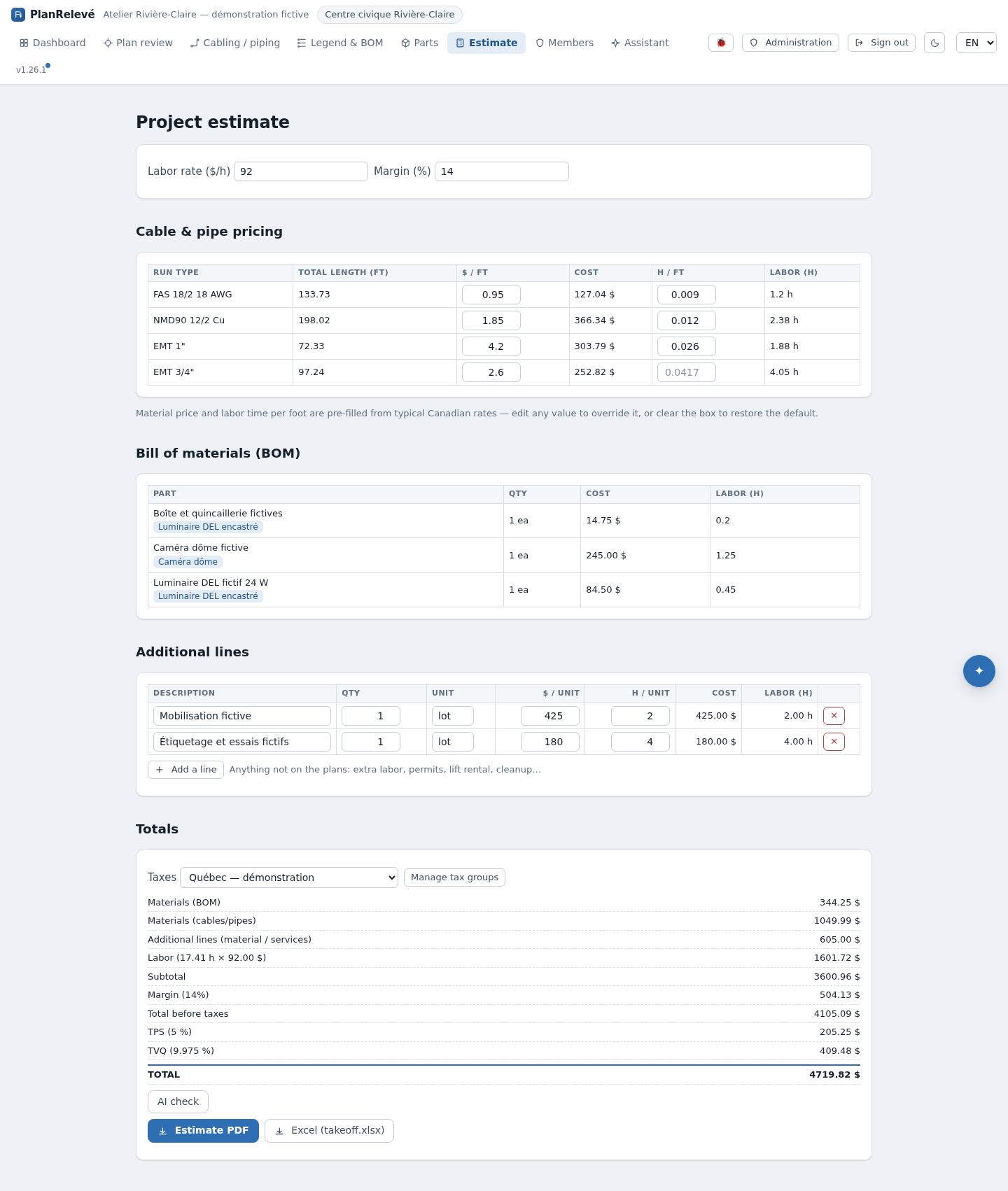
Build the estimate
- Enter the Labor rate ($/h) and the Margin (%). Every hour — recipes, runs and additional lines — is multiplied by that rate. The margin applies to the material + labour subtotal before taxes. A decimal comma is accepted:
45,50really means $45.50. - Review Cable & pipe pricing. Each Run type shows its Total length (ft), its $ / ft material price and its h / ft labour. A greyed value is a default; typing over it replaces it, and clearing the field restores the default.
- Check the Bill of materials (BOM). Edit recipes opens per-class editing without leaving the page — including for a class you have not counted yet.
- Add Additional lines: permits, rentals, mobilization, labour that is not on the plans. Each line takes a Description, Qty, unit, $ / unit and h / unit. A line with no description is not kept.
- Choose the group under Taxes, then check the Totals: material, hours, labour cost, subtotal, margin, taxes and grand total.
What gets priced, and what does not
Each confirmed attribute value becomes its own item: "Baseboard — 1000 W", "Baseboard — 250 W" and a no-attribute remainder, each with its own quantity. Name an assembly class::wattage_w=1000 to give it its own parts and hours; without one, each value inherits the class recipe. See Attributes.
An area is priced per square foot when an assembly carries the name class::area. The net surface — voids deducted — reaches the BOM and the estimate with its provenance.
The page now names what is missing instead of hiding it. Counted classes with no recipe are listed — "{n} counted class(es) have no recipe and contribute $0" — and, when nothing can be priced at all, the BOM explains why rather than showing an empty total. Runs and areas traced on a page with no scale are flagged here as well as in the exports.
Every line states where its price comes from: your project override, a project part, the catalog, a Supplier quote or a built-in default, with the calculation date.
Supplier quote
The Supplier quote card sends the current bill of materials to a supplier without leaving the estimate: choose the contact, then Request a quote. Manage → opens the full tracking view and Add a supplier → creates a first contact. The newest valid price then returns into the BOM with its badge. See Suppliers.
Taxes: dynamic default and snapshot
Owners and administrators define groups under Administration → Tax groups (Manage tax groups links there). The initial Québec group holds GST 5% and QST 9.975%, both on the base amount. A group can hold several ordered lines, including a compound tax whose base includes earlier taxes.
While the estimate stays on the default group, it follows the organization's current default. Choosing a group explicitly stores a snapshot of its name, rates and their order. A later administrative change therefore does not move that estimate. No tax stores an empty snapshot. To adopt new rates, select the group again.
Recalculation, checks and export
The page recalculates after every save and on every read. Confirming a detection, editing a recipe or a price, recalibrating a page or changing a reserve changes the next calculation; no global recalculate button is needed.
AI check opens the AI assistant to flag missing prices or unusual quantities. It is optional help, not an approval. Then export the Estimate PDF or the Excel (takeoff.xlsx) workbook from Exports; amounts, hours and percentages are written the way the document's language writes them.
Limits and recovery
An empty field is not a market price, and a default is not a supplier quote. If a total looks wrong, check in order: enabled pages, statuses, classes with no recipe, attribute values, the scale of measured pages, catalog tiers and quotes, multipliers and reserves, hours per foot, additional lines, rate, margin and the tax snapshot. Exports are immutable: after a correction, produce a new file.